docs
CSV & JSON Table Studio — User Guide
Works in: Confluence (macro) and Jira (issue panel) Hosting: runs entirely on Atlassian Forge, with no outbound network access. Data is parsed in your browser and saved in Forge storage on your own site.
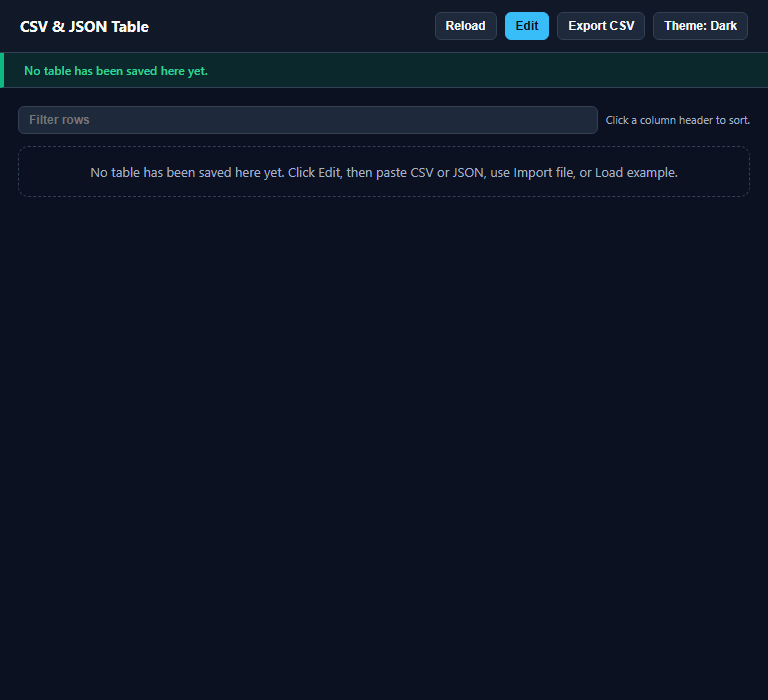
Table Studio turns pasted or imported CSV or JSON into a sortable, filterable table, with Sum and Avg shown under numeric columns. Everyone who views the page or issue sees the same saved table.
Quick start
- Confluence: edit a page, type
/, and choose CSV & JSON Table Studio. Jira: open an issue and open the CSV & JSON Table Studio panel. - Click Edit, then choose a Source format:
- CSV (first row is the header)
- JSON (list of flat objects): each object’s keys become columns.
- Paste your data or click Import file. The preview updates as you type.
- Type in Filter rows to narrow the table, and click a column header to sort.
- Click Save. The data, sort and filter become the default view for everyone.
Export CSV downloads the rows that match the current filter, in the current sort order.
Who can save
Anyone who can see the page or issue can view the table. Saving needs permission to edit that page or issue. If two people edit at once, the second save is refused as out of date, so nobody silently overwrites someone else; reload and reapply your change.
Safety
- Cells are always shown as text, so HTML or scripts in your data never run.
- Spreadsheet formula protection: cells that start with
=,+,-or@followed by formula commands (such as=HYPERLINK(or=cmd) are refused, so an exported CSV can’t run formulas in Excel or Sheets. - Badly formed CSV (ragged rows, empty headers) or JSON gets an amber message that points at the problem.
Limits
| Limit | Value |
|---|---|
| Rows per table | 5,000 |
| Rows shown on screen at once | 500 (filter to find others; Export CSV includes every matching row) |
| Stored table size | about 240 KB, Forge’s per-item limit |
Permissions
| Scope | Why |
|---|---|
storage:app |
Save each table for its macro or issue. |
read:page:confluence, read:jira-work |
Check that you can edit the page or issue before saving. |
FAQ
Is my data sent anywhere? No. It is parsed in your browser and stored in Forge storage on your site.
What happens if the licence lapses? Saved tables still display, read-only. Saving needs an active licence or trial.