docs
Webhook Router — User Guide
Works in: Jira (admin page, plus an inbound webhook address) Hosting: runs entirely on Atlassian Forge, with no outbound network access. The webhook address is a Forge web trigger, and issues are created through Jira’s own API.
Webhook Router gives you a secret webhook address. Any tool that can send JSON over HTTPS — monitoring, CI, alerting or your own scripts — can post to it, and each event becomes a Jira issue. Repeats of the same alert are skipped instead of filling your backlog.
Set it up
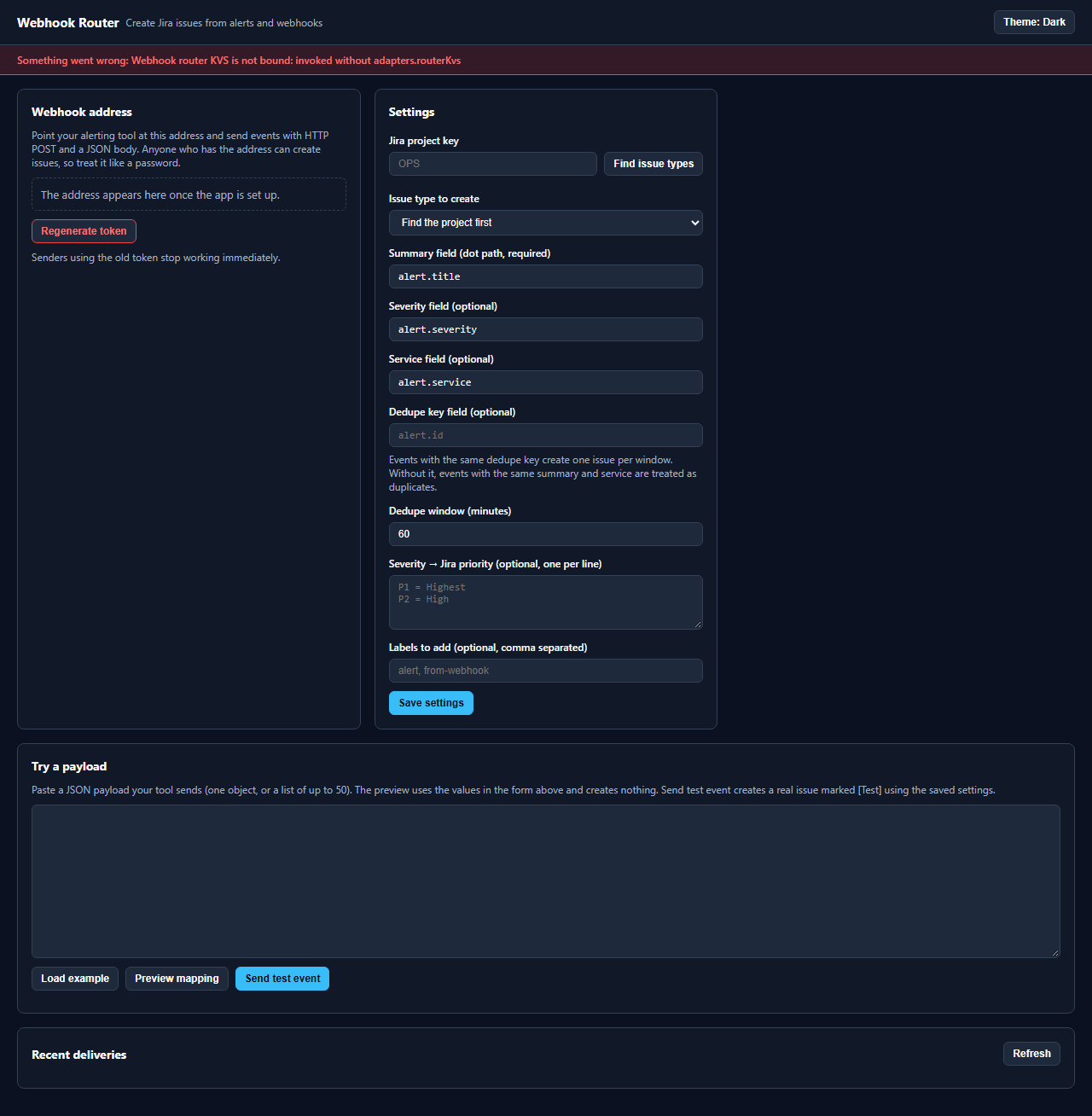
- Go to Jira settings → Apps → Webhook Router.
- Under Settings:
- Jira project key (for example
OPS), then Find issue types and pick the Issue type to create. - Summary field: the dot path to the issue summary in your JSON, for example
alert.title. Required. - Severity field, Service field: optional dot paths, added to the issue description.
- Dedupe key field: optional, for example
alert.id. Events with the same value inside the Dedupe window become one issue. - Severity → Jira priority: one mapping per line, for example
critical = Highest. - Labels to add: comma separated.
- Jira project key (for example
- Click Save settings.
- Under Try a payload, click Load example and Preview mapping to check the result, then Send test event to create a real test issue.
- Copy the Webhook address into your sending tool.
Send events
Use either form:
# Token in the address (simplest)
curl -X POST "https://<your-webhook-address>?token=<token>" \
  -H 'Content-Type: application/json' \
  -d '{"alert":{"title":"Disk full on db-1","severity":"critical","id":"inc-1"}}'

# Token in a header
curl -X POST "https://<your-webhook-address>" \
  -H 'Authorization: Bearer <token>' -H 'Content-Type: application/json' \
  -d '{"alert":{"title":"Disk full on db-1","severity":"critical","id":"inc-1"}}'
Send one JSON object, or an array of up to 50 objects to create several issues at once.
What the sender gets back
| HTTP status | Meaning |
|---|---|
| 202 | Accepted: issues were created. |
| 200 | Duplicate: already seen inside the dedupe window, so no new issue. |
| 400 | Invalid: not POST, not JSON, too large, or missing the summary field. |
| 401 | Missing or wrong token. |
| 402 | No active licence or trial. |
| 503 | The router has not been configured yet. |
| 500 | Something unexpected failed; the sender should retry. |
Recent deliveries on the admin page shows the last 50 results with the time, outcome, issue key and a short reason.
Duplicates
With a Dedupe key field, events that share the same value in the same project count as one alert for the dedupe window (default 60 minutes, at most 7 days). Without one, events with the same project, service and summary count as the same alert. Test events never suppress real ones.
Security
- Every request needs the secret token. Regenerate token immediately invalidates the old address.
- Bodies over 256 KB, or with more than 50 events, are refused.
- Payload values are treated as plain text. Keys such as
__proto__are ignored, and nothing in a payload can run code in Jira or in the app.
What ends up in the issue
The summary comes from your summary field. The description lists severity and service, plus the original payload as a JSON code block of up to 20,000 characters. Anyone who can see the issue can see that content, so don’t send secrets in webhook bodies.
Permissions
| Scope | Why |
|---|---|
storage:app |
Keep the settings, the token, the delivery log and expiring duplicate checks. |
read:jira-work |
Check the project and list its issue types. |
write:jira-work |
Create issues from accepted events. |
Issues are created by the app itself, because no Jira user is present when a webhook arrives.
FAQ
Can it create Confluence pages? No. It creates Jira issues only.
Does the payload pass through your servers? No. The webhook address is hosted by Atlassian Forge, and the app has no outbound network access.